mindbodygreen: Student Dashboard

OVERVIEW

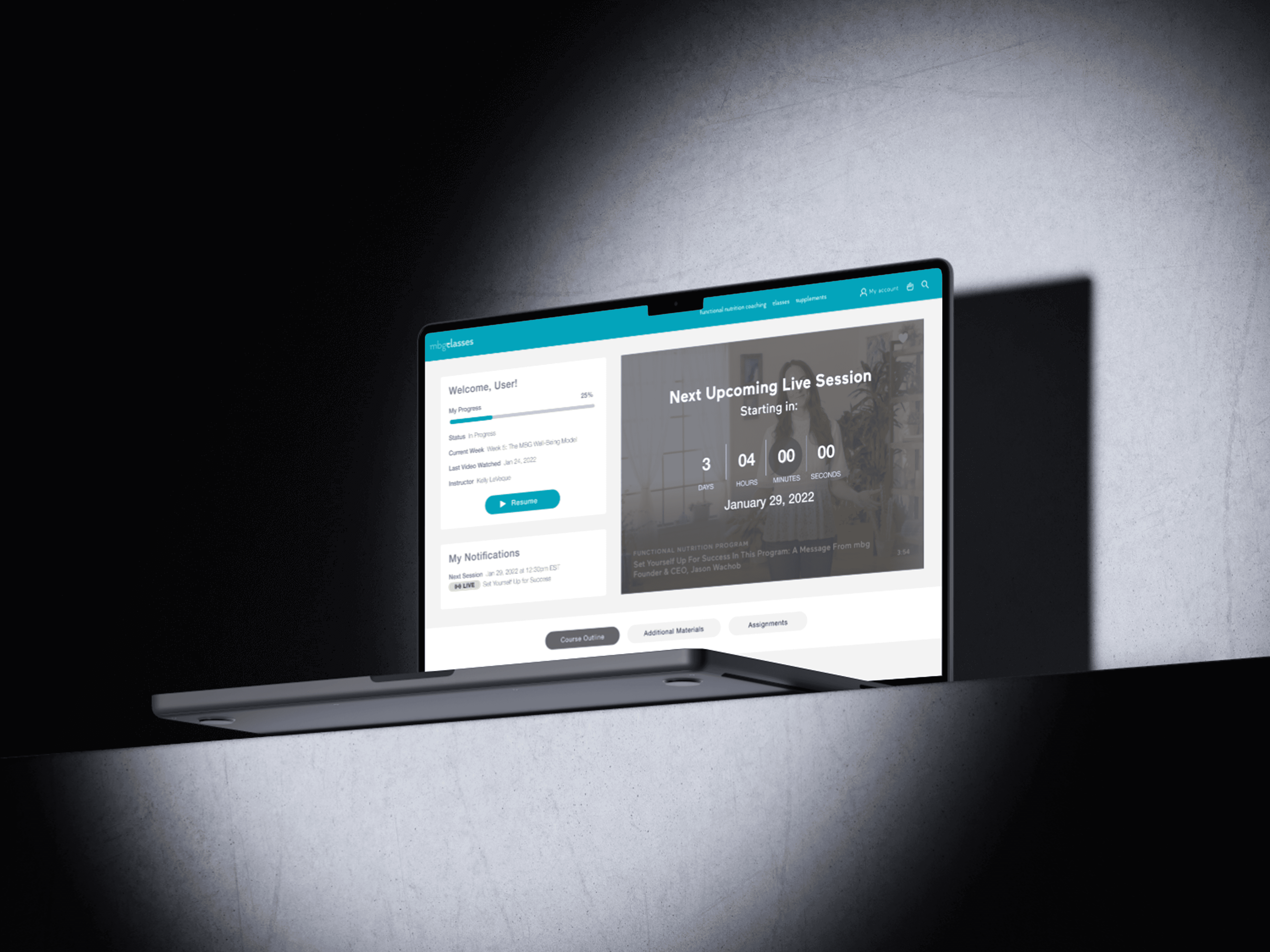
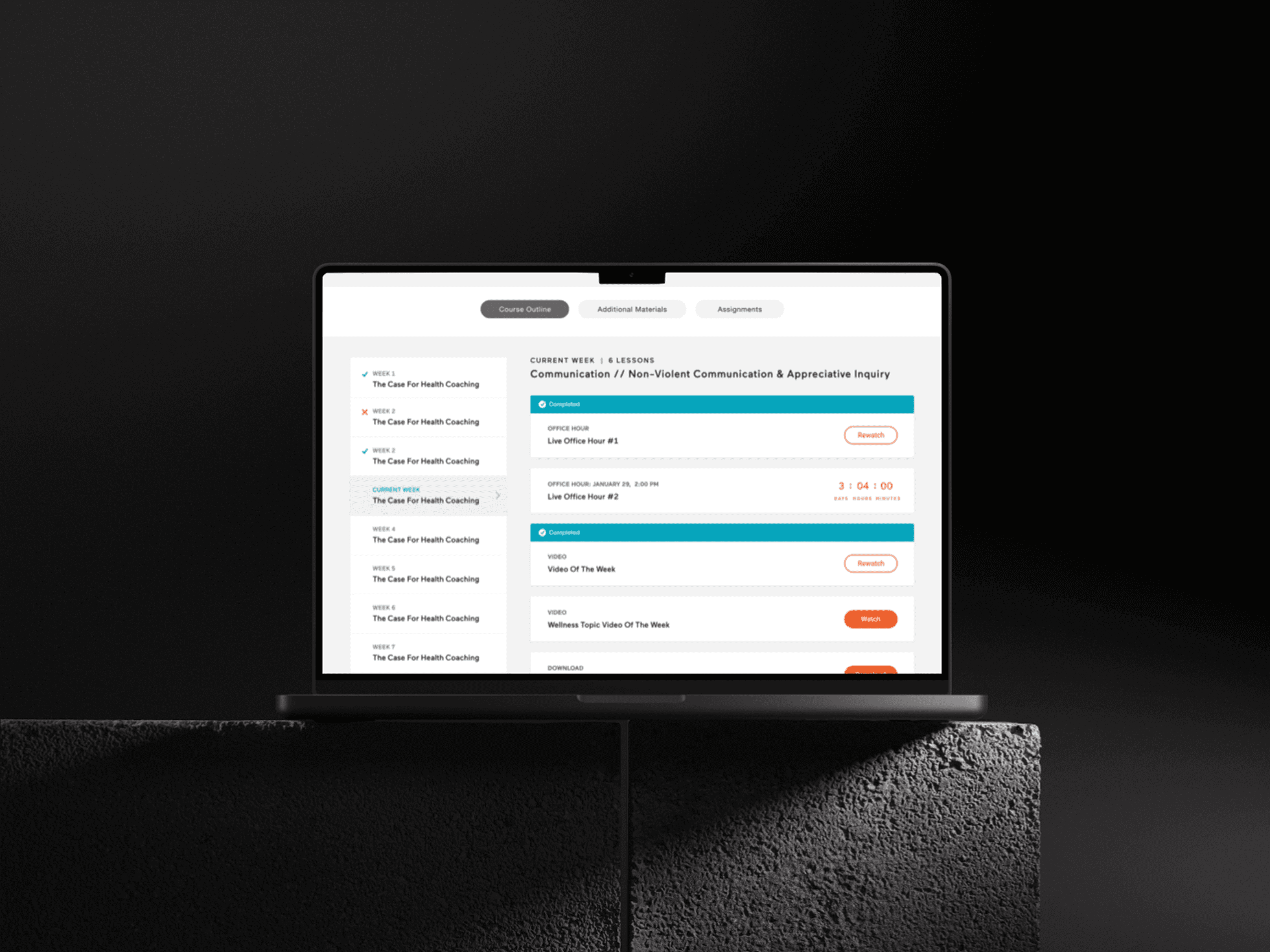
Designed and built the student dashboard experience from the ground up for mindbodygreen’s Health Coach Certification program. The dashboard served as the central hub for enrolled students to track progress, access lessons, manage coursework, and attend live lectures—while supporting both self-paced and scheduled learning components.
YEAR

2020

ROLE

Lead UX Designer

CATEGORY

Dashboard Design • EdTech Learning Experience

About the project

Online learning sounds simple—until you’re juggling pre-recorded lessons, live lectures, assignments, attendance tracking, and “wait… when is my class again?” moments.

For the mindbodygreen Health Coach Certification program—a 20-week, cohort-based course with live classes, video content, and real-time participation requirements —students needed a central place to keep their entire experience organized.

The goal was to turn what could easily feel like chaos into something structured, intuitive, and actually motivating to come back to (because no one signs up for a certification program hoping to feel lost).

Goal

Improve student engagement, lesson completion, and live lecture attendance by creating a centralized, easy-to-navigate dashboard that helped students stay on track throughout a multi-week certification program. Additionally, leverage the dashboard as a retention and growth tool—encouraging students to complete the program and seamlessly discover and enroll in additional courses, increasing long-term engagement and lifetime value (without making it feel like they were being sold to mid-lesson).

Challenges

DESIGNING FOR A "HYBRID" LEARNING EXPERIENCE (AKA: NOT JUST ANOTHER DASHBOARD) This wasn’t just a content library—it was part LMS, part scheduler, part progress tracker. Students had: - Pre-recorded lessons - Live lectures (with specific times) - Assignments + participation requirements The challenge was designing something that didn’t feel overwhelming while still supporting all of these moving pieces. I approached this by prioritizing hierarchy—what do students need to do next vs what’s just “nice to explore.” The dashboard became more action-oriented instead of just being informational.

LIVE LECTURES: THE "DON'T MISS THIS OR YOU'RE SCREWED" PROBLEM Live sessions were a core part of the program—and missing them wasn’t ideal. But initially, there was friction around: - Remembering when lectures started - Finding the correct Zoom link - Tracking attendance So I leaned into making live sessions more visible and time-based: - Clear upcoming lecture modules - Timely reminders and CTAs (join now vs upcoming) - Easy access to links right when users needed them Because if users have to dig for a Zoom link… they’re already annoyed.

TRACKING PROGRESS WITHOUT MAKING IT FEEL LIKE SCHOOL Progress tracking sounds great in theory, but if it feels too rigid, it can actually discourage users. I designed progress indicators that felt lightweight and motivating—helping students understand where they were in the program without making it feel like a checklist they were failing. The goal was: “I’m making progress” vs “I’m behind.” COLLECTING + SURFACING THE RIGHT INFORMATION (FOR USERS AND THE BUSINESS) This dashboard wasn’t just for students—it also needed to support internal teams tracking engagement, attendance, and completion. I had to think through: - What students need to see - What internal teams need to track - How those two things connect This influenced how we structured data, surfaced statuses (completed, upcoming, missed), and ensured the experience worked beyond just the UI layer.

Results

Once everything came together, the dashboard did what a good product should do—it made a complicated experience feel simple (which, in this case, meant fewer confused students and fewer “where do I click?” emails). We saw a clear lift in engagement across the board—students were progressing through lessons more consistently, and live lecture attendance improved thanks to better visibility, timing cues, and easier access to join links (turns out, putting the Zoom link where people can actually find it works). Completion rates increased, and we saw a noticeable reduction in drop-off during key points in the program—especially around transitions between modules and live sessions. The more structured, guided experience helped students stay on track without feeling overwhelmed. From a business perspective, the dashboard also contributed to improved retention and continued enrollment, as students were more likely to finish the program and explore additional courses surfaced within the experience. Internally, teams gained better visibility into student progress, attendance, and engagement, making it easier to support learners and optimize the program over time. Overall, we turned what could have been a fragmented learning experience into a centralized system that supported both user success and long-term program growth—which is really the goal (and a lot more fun than chaos).

Smooth Scroll
This will hide itself!

mindbodygreen: Student Dashboard

OVERVIEW

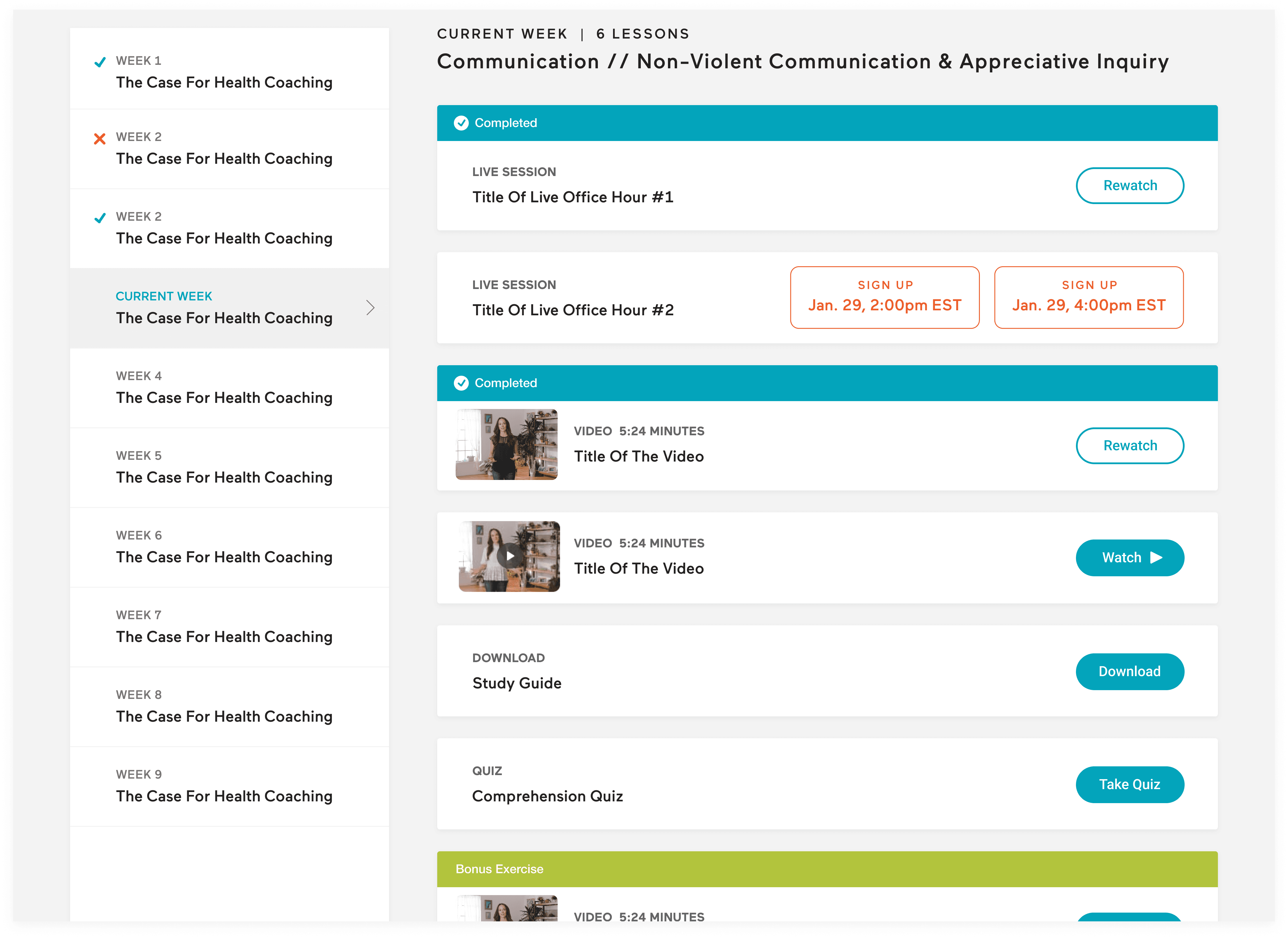
Designed and built the student dashboard experience from the ground up for mindbodygreen’s Health Coach Certification program. The dashboard served as the central hub for enrolled students to track progress, access lessons, manage coursework, and attend live lectures—while supporting both self-paced and scheduled learning components.
YEAR

2020

ROLE

Lead UX Designer

CATEGORY

Dashboard Design • EdTech Learning Experience

About the project

Online learning sounds simple—until you’re juggling pre-recorded lessons, live lectures, assignments, attendance tracking, and “wait… when is my class again?” moments.

For the mindbodygreen Health Coach Certification program—a 20-week, cohort-based course with live classes, video content, and real-time participation requirements —students needed a central place to keep their entire experience organized.

The goal was to turn what could easily feel like chaos into something structured, intuitive, and actually motivating to come back to (because no one signs up for a certification program hoping to feel lost).

Goal

Improve student engagement, lesson completion, and live lecture attendance by creating a centralized, easy-to-navigate dashboard that helped students stay on track throughout a multi-week certification program. Additionally, leverage the dashboard as a retention and growth tool—encouraging students to complete the program and seamlessly discover and enroll in additional courses, increasing long-term engagement and lifetime value (without making it feel like they were being sold to mid-lesson).

Challenges

DESIGNING FOR A "HYBRID" LEARNING EXPERIENCE (AKA: NOT JUST ANOTHER DASHBOARD) This wasn’t just a content library—it was part LMS, part scheduler, part progress tracker. Students had: - Pre-recorded lessons - Live lectures (with specific times) - Assignments + participation requirements The challenge was designing something that didn’t feel overwhelming while still supporting all of these moving pieces. I approached this by prioritizing hierarchy—what do students need to do next vs what’s just “nice to explore.” The dashboard became more action-oriented instead of just being informational.

LIVE LECTURES: THE "DON'T MISS THIS OR YOU'RE SCREWED" PROBLEM Live sessions were a core part of the program—and missing them wasn’t ideal. But initially, there was friction around: - Remembering when lectures started - Finding the correct Zoom link - Tracking attendance So I leaned into making live sessions more visible and time-based: - Clear upcoming lecture modules - Timely reminders and CTAs (join now vs upcoming) - Easy access to links right when users needed them Because if users have to dig for a Zoom link… they’re already annoyed.

TRACKING PROGRESS WITHOUT MAKING IT FEEL LIKE SCHOOL Progress tracking sounds great in theory, but if it feels too rigid, it can actually discourage users. I designed progress indicators that felt lightweight and motivating—helping students understand where they were in the program without making it feel like a checklist they were failing. The goal was: “I’m making progress” vs “I’m behind.” COLLECTING + SURFACING THE RIGHT INFORMATION (FOR USERS AND THE BUSINESS) This dashboard wasn’t just for students—it also needed to support internal teams tracking engagement, attendance, and completion. I had to think through: - What students need to see - What internal teams need to track - How those two things connect This influenced how we structured data, surfaced statuses (completed, upcoming, missed), and ensured the experience worked beyond just the UI layer.

Results

Once everything came together, the dashboard did what a good product should do—it made a complicated experience feel simple (which, in this case, meant fewer confused students and fewer “where do I click?” emails). We saw a clear lift in engagement across the board—students were progressing through lessons more consistently, and live lecture attendance improved thanks to better visibility, timing cues, and easier access to join links (turns out, putting the Zoom link where people can actually find it works). Completion rates increased, and we saw a noticeable reduction in drop-off during key points in the program—especially around transitions between modules and live sessions. The more structured, guided experience helped students stay on track without feeling overwhelmed. From a business perspective, the dashboard also contributed to improved retention and continued enrollment, as students were more likely to finish the program and explore additional courses surfaced within the experience. Internally, teams gained better visibility into student progress, attendance, and engagement, making it easier to support learners and optimize the program over time. Overall, we turned what could have been a fragmented learning experience into a centralized system that supported both user success and long-term program growth—which is really the goal (and a lot more fun than chaos).

Smooth Scroll
This will hide itself!

mindbodygreen: Student Dashboard

OVERVIEW

Designed and built the student dashboard experience from the ground up for mindbodygreen’s Health Coach Certification program. The dashboard served as the central hub for enrolled students to track progress, access lessons, manage coursework, and attend live lectures—while supporting both self-paced and scheduled learning components.

YEAR

2020

ROLE

Lead UX Designer

CATEGORY

Dashboard Design • EdTech Learning Experience

About the project

Online learning sounds simple—until you’re juggling pre-recorded lessons, live lectures, assignments, attendance tracking, and “wait… when is my class again?” moments.

For the mindbodygreen Health Coach Certification program—a 20-week, cohort-based course with live classes, video content, and real-time participation requirements —students needed a central place to keep their entire experience organized.

The goal was to turn what could easily feel like chaos into something structured, intuitive, and actually motivating to come back to (because no one signs up for a certification program hoping to feel lost).

Goal

Improve student engagement, lesson completion, and live lecture attendance by creating a centralized, easy-to-navigate dashboard that helped students stay on track throughout a multi-week certification program. Additionally, leverage the dashboard as a retention and growth tool—encouraging students to complete the program and seamlessly discover and enroll in additional courses, increasing long-term engagement and lifetime value (without making it feel like they were being sold to mid-lesson).

Challenges

DESIGNING FOR A "HYBRID" LEARNING EXPERIENCE (AKA: NOT JUST ANOTHER DASHBOARD) This wasn’t just a content library—it was part LMS, part scheduler, part progress tracker. Students had: - Pre-recorded lessons - Live lectures (with specific times) - Assignments + participation requirements The challenge was designing something that didn’t feel overwhelming while still supporting all of these moving pieces. I approached this by prioritizing hierarchy—what do students need to do next vs what’s just “nice to explore.” The dashboard became more action-oriented instead of just being informational.

LIVE LECTURES: THE "DON'T MISS THIS OR YOU'RE SCREWED" PROBLEM Live sessions were a core part of the program—and missing them wasn’t ideal. But initially, there was friction around: - Remembering when lectures started - Finding the correct Zoom link - Tracking attendance So I leaned into making live sessions more visible and time-based: - Clear upcoming lecture modules - Timely reminders and CTAs (join now vs upcoming) - Easy access to links right when users needed them Because if users have to dig for a Zoom link… they’re already annoyed.

TRACKING PROGRESS WITHOUT MAKING IT FEEL LIKE SCHOOL Progress tracking sounds great in theory, but if it feels too rigid, it can actually discourage users. I designed progress indicators that felt lightweight and motivating—helping students understand where they were in the program without making it feel like a checklist they were failing. The goal was: “I’m making progress” vs “I’m behind.” COLLECTING + SURFACING THE RIGHT INFORMATION (FOR USERS AND THE BUSINESS) This dashboard wasn’t just for students—it also needed to support internal teams tracking engagement, attendance, and completion. I had to think through: - What students need to see - What internal teams need to track - How those two things connect This influenced how we structured data, surfaced statuses (completed, upcoming, missed), and ensured the experience worked beyond just the UI layer.

Results

Once everything came together, the dashboard did what a good product should do—it made a complicated experience feel simple (which, in this case, meant fewer confused students and fewer “where do I click?” emails). We saw a clear lift in engagement across the board—students were progressing through lessons more consistently, and live lecture attendance improved thanks to better visibility, timing cues, and easier access to join links (turns out, putting the Zoom link where people can actually find it works). Completion rates increased, and we saw a noticeable reduction in drop-off during key points in the program—especially around transitions between modules and live sessions. The more structured, guided experience helped students stay on track without feeling overwhelmed. From a business perspective, the dashboard also contributed to improved retention and continued enrollment, as students were more likely to finish the program and explore additional courses surfaced within the experience. Internally, teams gained better visibility into student progress, attendance, and engagement, making it easier to support learners and optimize the program over time. Overall, we turned what could have been a fragmented learning experience into a centralized system that supported both user success and long-term program growth—which is really the goal (and a lot more fun than chaos).

Smooth Scroll
This will hide itself!